Pax Connect for Mac · App interface is in Chinese

Mac proxy client · Built on sing-box

The Mac proxy client for Claude Code and Codex

Pax Connect is a sing-box based Mac proxy client that routes Claude Code and Codex without environment variables, manages relay API settings, and tracks token usage and cost locally.

macOS 26 or later · Apple Silicon

App interface is in Chinese

Bring your own routes and API service

Illustration

claude in the terminal needs no env vars — Pax takes over its traffic

Pick a Profile and write it to Claude Code and Codex configs

Reads local logs for tokens and API-equivalent cost

Three things

Three things for Claude Code and Codex

Get online, point to your API service, and see what it costs, all in one Mac app. Every part is shown with the real interface.

01Routes and rules

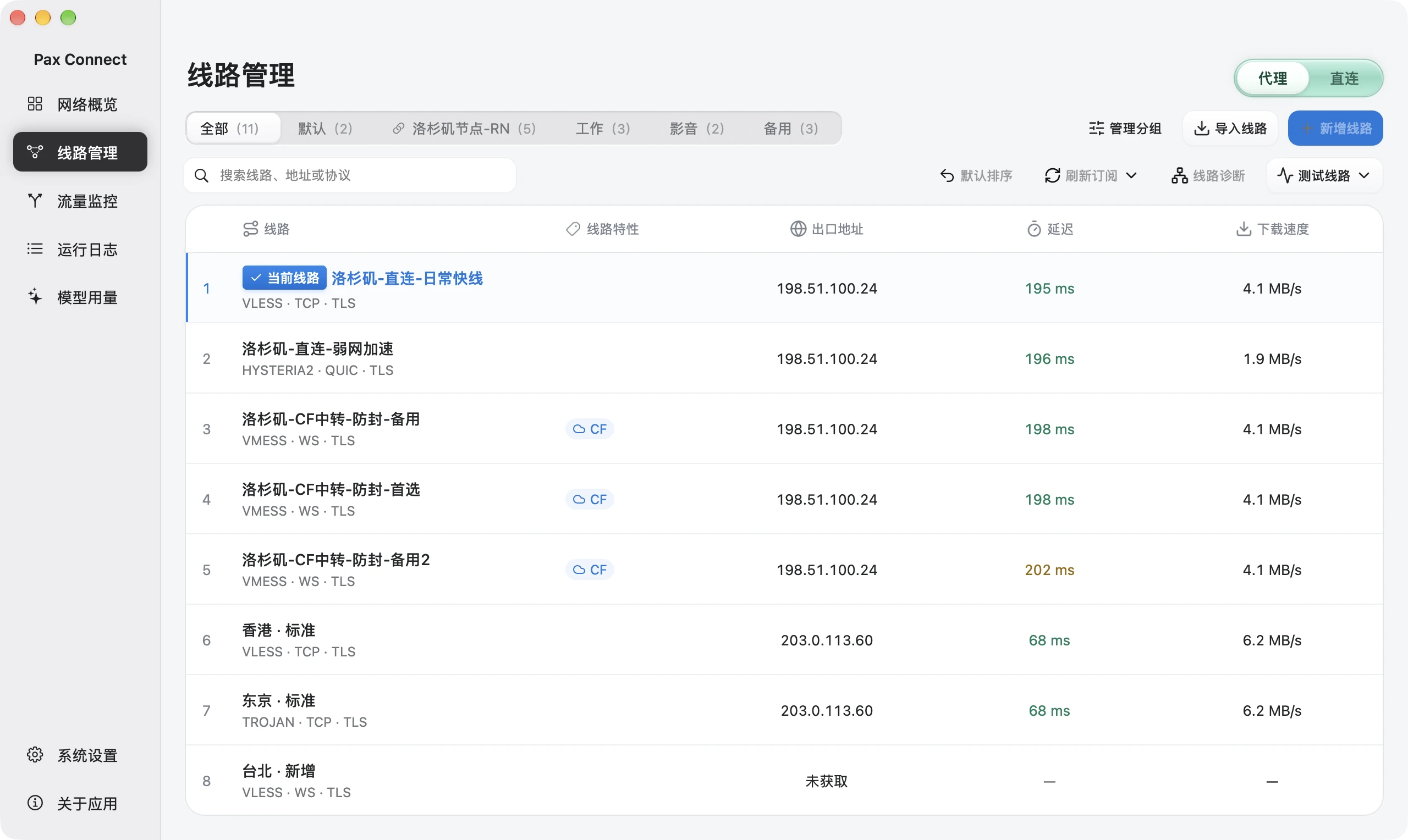
Route through a proxy

TUN takes over system traffic, so Claude Code and Codex need no environment variables, and you can see which route they actually used.

  • Switch between TUN and the system proxy
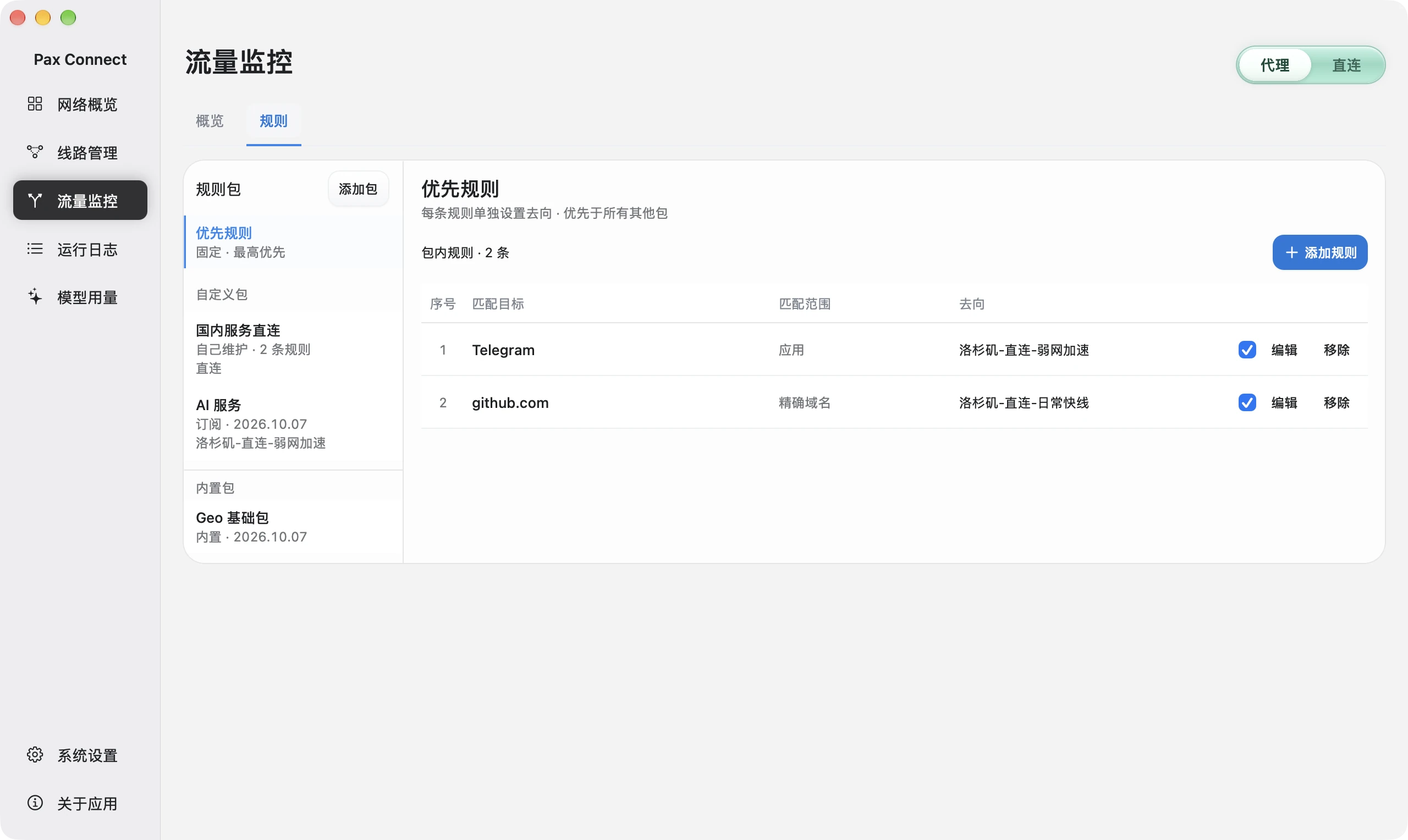
  • Route by domain, IP or .app application to a route, direct, or block
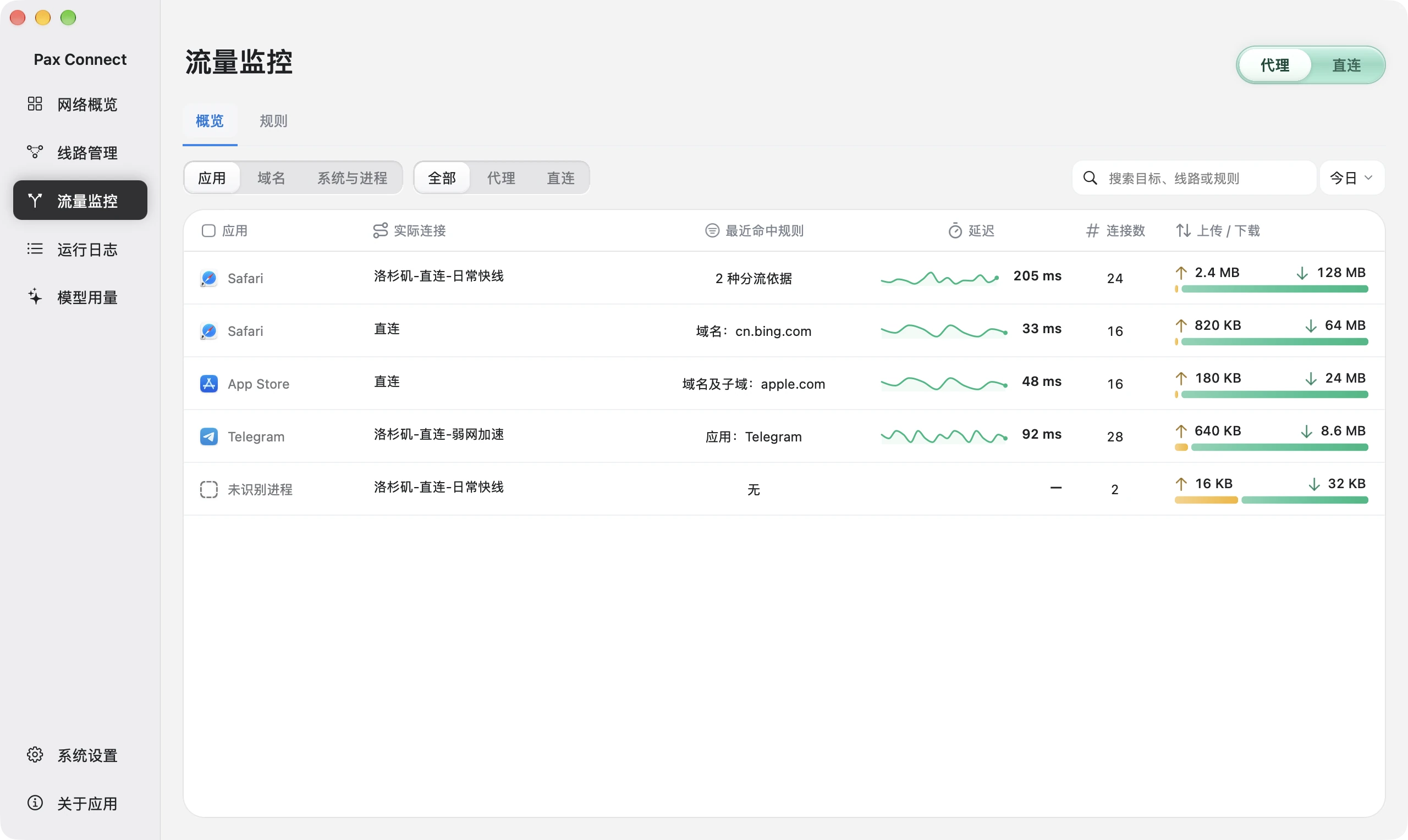
  • Traffic monitoring recognizes connections from the claude and codex processes
02API profiles

Manage relay APIs

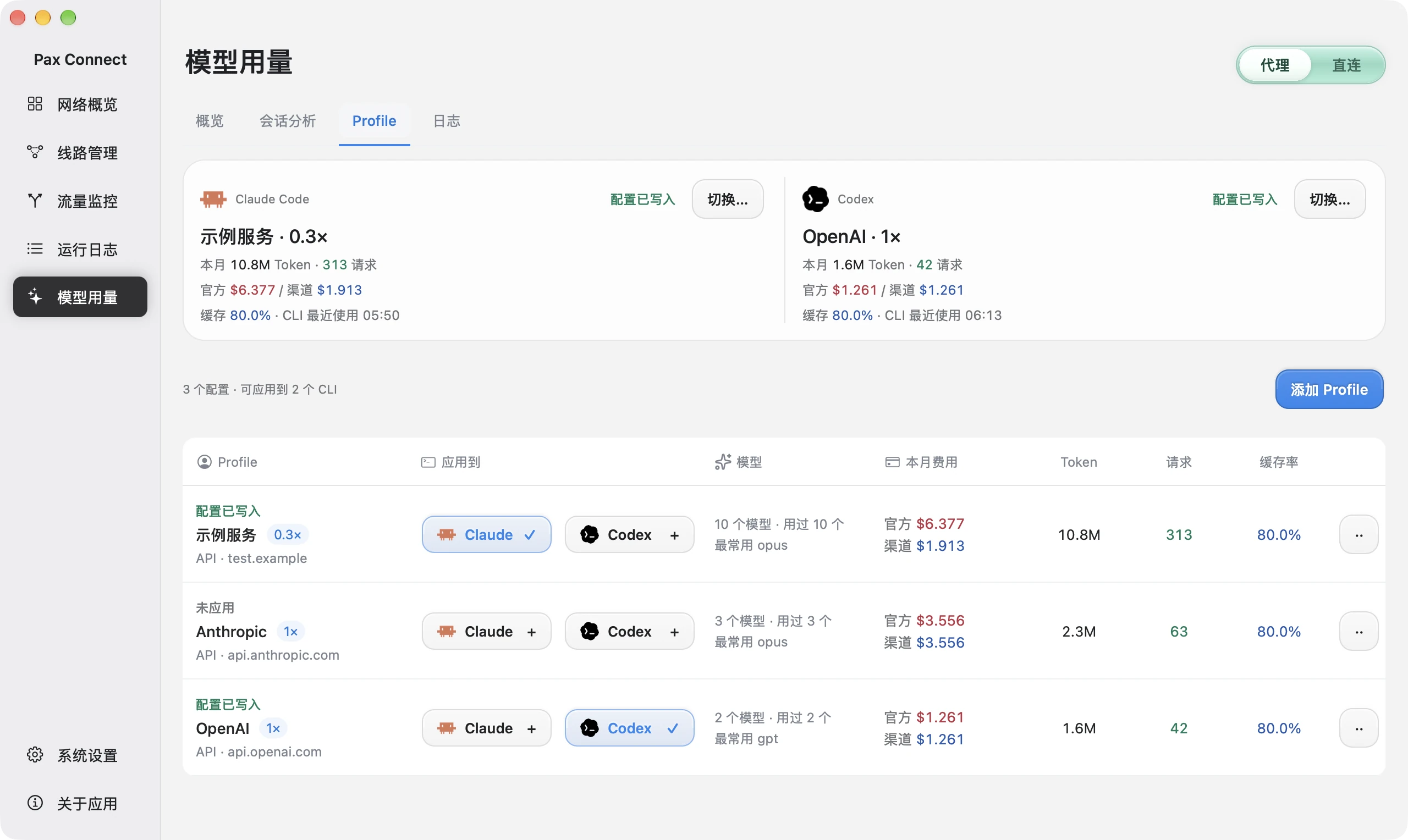
Save your own relay or custom API address and write it into the Claude Code and Codex config files, then switch whenever you need.

  • Several profiles, each with its service address and cost multiplier
  • Applying writes Claude Code’s settings.json and Codex’s config.toml
  • Saving and applying are separate, so written and unapplied profiles are easy to tell apart
03Usage and cost

Track usage

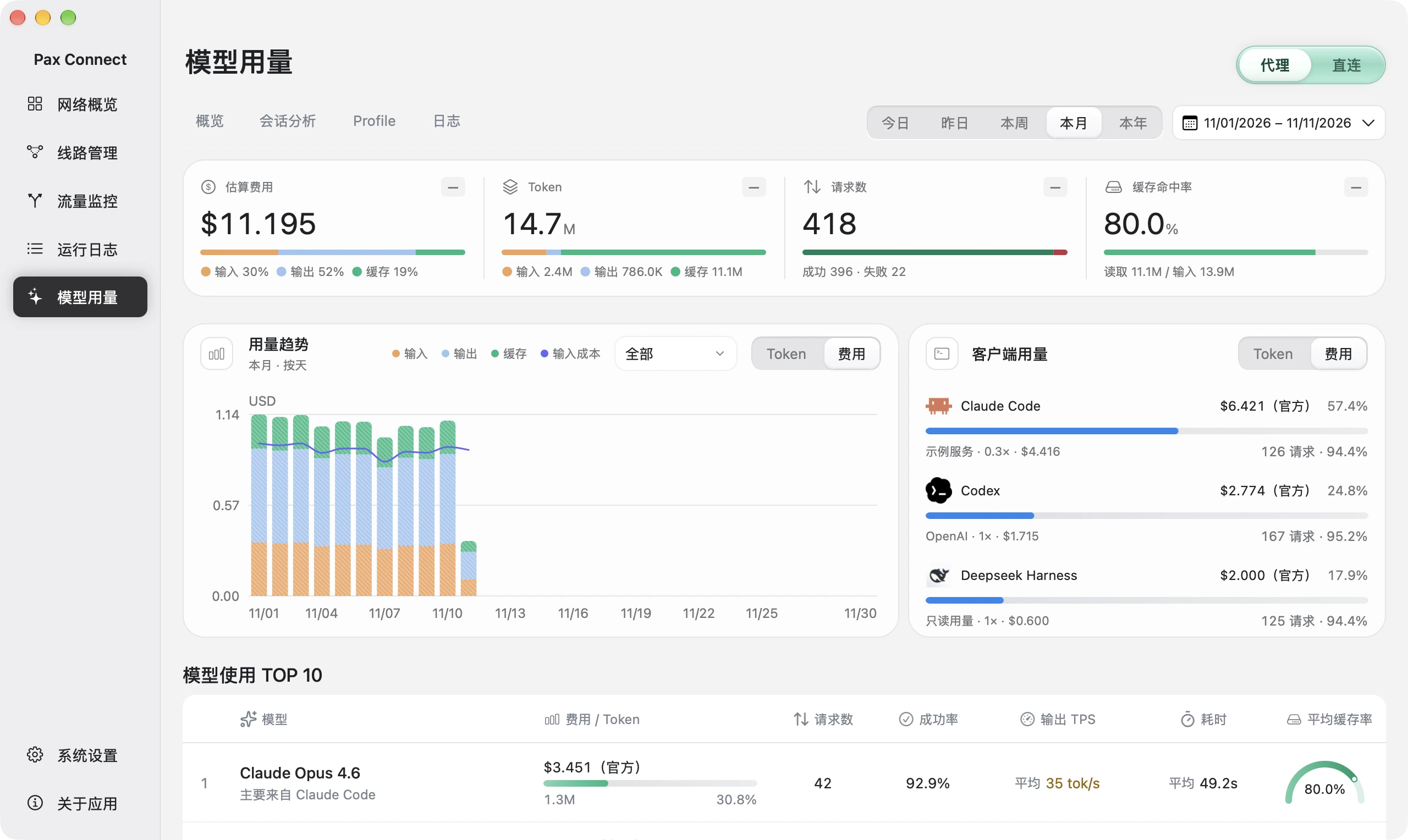
Reads local logs and totals tokens and estimated cost by date, model and session, with the main session and subagents shown separately.

  • Tokens, cache, requests and a model ranking
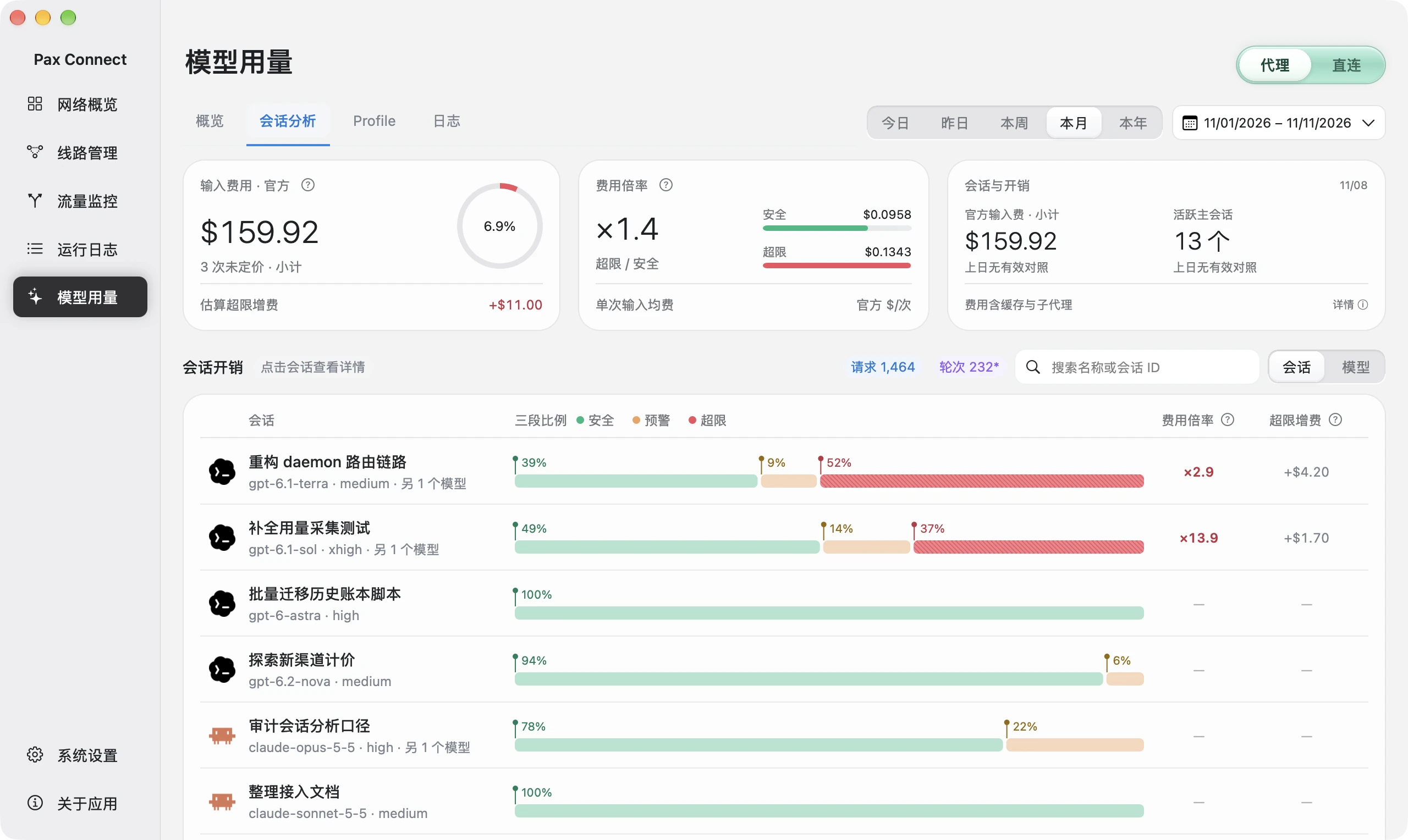
  • Per-request context with limit lines: start a new session once it goes over, saving cost and quota
  • Cost is an API-equivalent estimate, not a bill

How it works

How Pax does it

Three things do the work, and each one can be checked in the interface.

  1. 01

    TUN takeover

    Traffic is taken over at the system level, and you can switch between TUN and the system proxy. Command-line programs in the terminal go through it too, with no per-program setup.

  2. 02

    No environment variables

    Claude Code and Codex need no HTTPS_PROXY variable, and their config files stay untouched for proxying.

  3. 03

    Recognizes claude and codex processes

    Traffic monitoring shows the actual route and the matched rule per application, and recognizes connections from the claude and codex processes. Rules can only select .app applications, so command-line programs need domain rules.

Traffic overview by application with actual routes, matched rules, latency, connection counts and transfer.
Open Traffic monitoring → Overview to compare source, target and actual route.Actual Pax Demo interface · In-memory simulated data · Chinese UI · Captured November 11, 2026

Network core

sing-box

Built on sing-box, with a Mac interface on top

The network core is sing-box. Pax adds the Mac interface, routing rules, AI configuration and usage tracking on top. You bring your own route (node or subscription); Pax does not supply one. Pax Connect is an independent client, not an official sing-box product.

Route formats

  • VLESS
  • VMess
  • Trojan
  • Hysteria2
  • AnyTLS
  • Shadowsocks
  • Base64 subscriptions

Usage

Tokens and cost, worked out on your Mac

Pax reads the local Claude Code and Codex logs and totals tokens, cache and estimated cost by date and model, without adding a forwarding gateway. The point is to keep context under control: the longer the context, the more each request costs, and the faster your quota burns.

  • Viewing usage needs no proxy turned on and no saved profile
  • Cost uses a local price table: an API-equivalent amount, not a bill
  • Official subscription quotas and limits are not shown

The card on the side is a concept illustration with sample numbers, not a screenshot.

AI usageThis monthThis month ↗
Estimated this month
$23.58Estimated cost
01 NOVMonthly trend30 NOV
Token usage12.8M
Claude Code$16.42
Codex$7.16

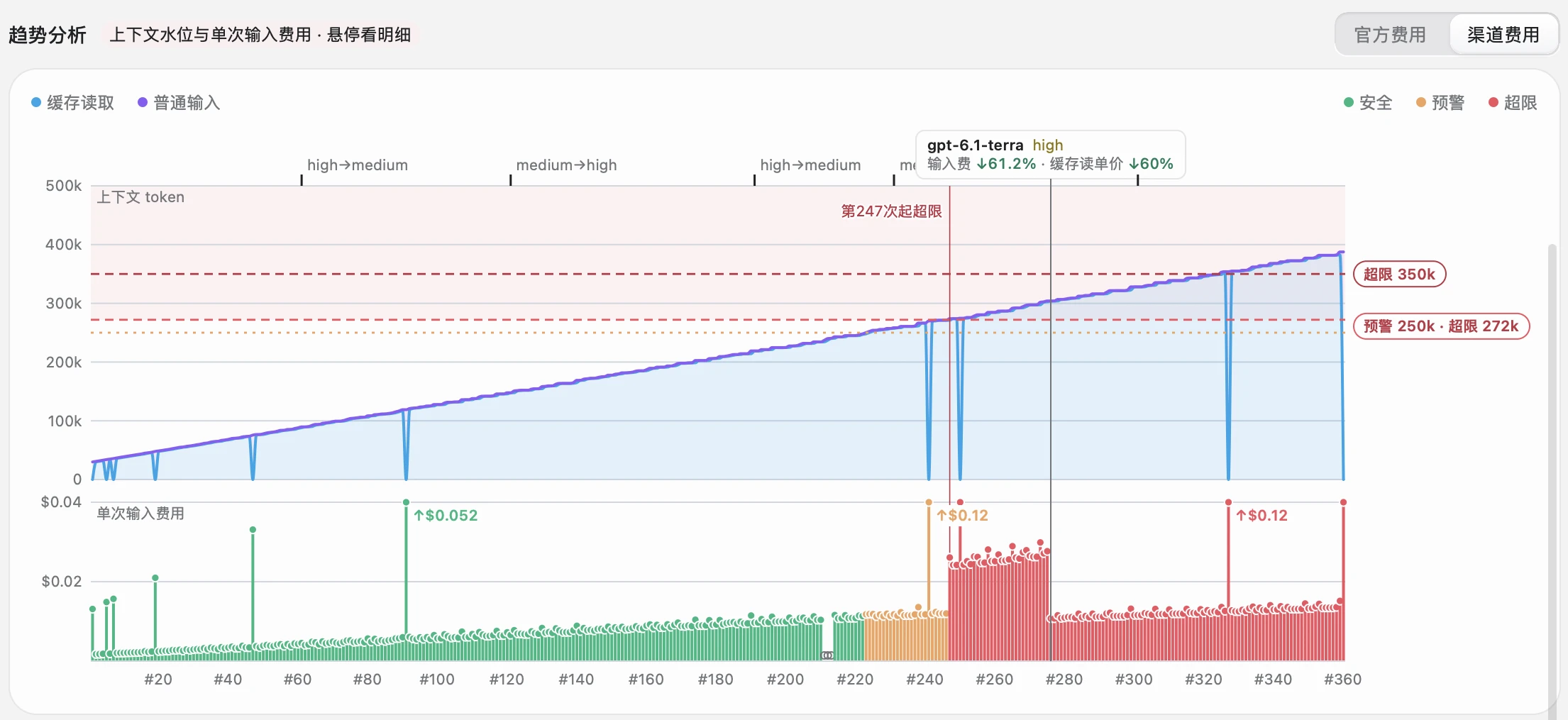
Session analysis · Save cost and quota

Over the context limit? Start a new session

Every request resends the whole context, so the longer it gets, the more it costs and the slower it runs. Pax marks where a session goes over the limit. Start a new session there and the same quota goes further.

Per-request session trend with context and cache above, input cost below, and model-change markers.
At the same request position, compare context, cache and input cost, then inspect model changes.Actual Pax Demo interface · In-memory simulated data · Chinese UI · Captured November 11, 2026
  1. Context above

    Read input and cache composition. Thresholds are economic references.

  2. Input cost below

    The same horizontal position is the same request. Output cost is excluded.

  3. Explain changes

    Check model, reasoning effort and cache changes before drawing conclusions.

Longer costs more

Every request resends the whole context. A task is often a dozen or more requests, so at 300k context it resends 15 × 300k = 4.5M tokens. For GPT models, above 272k the price per token doubles (input ×2, output ×1.5). Claude Opus and Sonnet have no surcharge, but cost still grows with context. On a subscription, quota also burns faster.

Longer is slower and drifts more

With a very long context the AI replies more slowly and is more likely to miss details from earlier on: slower and dumber. Carrying on spends more tokens for less result.

Pax tells you when to start over

Each model has a limit line, such as GPT 272k (warning at 250k), Claude Opus 200k (warning at 150k) and Sonnet 250k. Each request is marked safe, warning or over limit, and the chart says “over limit from request N”. A cost ratio of ×2 means an over-limit request’s input costs twice the safe-zone average. Pax also shows the estimated excess cost.

Rule of thumb: once context is in the over-limit zone, start a new session.

Costs are API-equivalent estimates, not bills. Official subscription quota is not shown.

Route formats

Supported route formats

Import node links or subscriptions you already have. These are the supported protocols and variants.

  • VLESSReality, Vision, ws, httpupgrade
  • VMesslimited combinations
  • Trojan
  • Hysteria2salamander supported, no port hopping
  • AnyTLS
  • Shadowsocksno plugins
  • Base64 subscriptions

Not supported

  • Clash YAML
  • sing-box JSON
  • VLESS over gRPC or XHTTP
  • Hysteria2 port hopping
  • Shadowsocks plugins

Importing nodes and subscriptions (Chinese page)

Compare

How is Pax different from Clash and Surge?

Clash and Surge are great at general proxying. But to make Claude Code and Codex run smoothly you still handle terminal proxying, API config switching and usage tracking yourself. Pax puts all three in one app.

General tools such as Clash and SurgePax Connect
Designed forPeople who want to manage traffic for every appDevelopers who code with Claude Code and Codex every day
Proxy for claude and codexSet HTTPS_PROXY and similar env vars, or enable enhanced mode and write rules yourselfTurn on TUN takeover, no env vars; the traffic monitor shows which route claude and codex took
Switch relay / API serviceOut of scope; edit settings.json and config.toml by handSave several Profiles and write one to Claude Code and Codex in a click
Tokens and costOut of scope; find another toolReads local logs for tokens and estimated cost by date, model and session

Mac proxy clients compared (Chinese page)

FAQ

FAQ

01

How do I set up a proxy for Claude Code?

The generic way is the HTTPS_PROXY environment variable, or the env block of ~/.claude/settings.json. With Pax TUN takeover turned on, you need neither.

02

Can I route only the claude process through the proxy?

Not directly. Rules can only select .app applications, not command-line programs. A domain rule gives a similar result, and claude process traffic is still recognized in traffic monitoring.

03

Does Pax provide nodes or relays?

No, and it does not recommend any relay or node provider. You bring your own routes and API service; Pax handles import, routing and writing configuration.

04

How do I check Claude Code usage?

Pax reads local Claude Code, Codex and DeepSeek Harness logs and shows tokens, cache and estimated cost. Cost is an API-equivalent amount, not a bill, and official quotas and limits are not shown.

05

When should I start a new session?

Start a new one once the context is in the over-limit zone. Pax’s session analysis marks safe, warning and over limit per model, for example above 272k for GPT and above 200k for Claude Opus. Past that point every request resends a very long context: it costs more, runs slower and misses details more often. Carry the key points into a new session so tokens go to useful work and the same quota does more.

06

Can Pax import a Clash subscription?

It imports Base64 subscriptions and node links, but not Clash YAML or sing-box JSON.

Download and requirements

This is an unnotarized beta for Macs with macOS 26 or later on Apple Silicon. The button downloads the installer; read the first-launch notes before opening it.

Requires a Mac with macOS 26 or later on Apple Silicon. The app interface is in Chinese only.

Pax, on your Mac.

Get the Mac installer. Read the system requirements and installation notes before opening the app.

Download for Mac

macOS 26+ · Apple Silicon

System requirements & installation ↗
Actual Pax Demo interface · In-memory simulated data

Captured November 11, 2026. Chinese app UI; figures are simulated, not measurements or a bill. Click to enlarge.