
Which usage do you want to see?
| You want to know | Start with | Watch out for |
|---|---|---|
| Tokens and estimated cost of the current session | /usage inside Claude Code (/cost is an alias) | Totals reset after /clear; it covers the current session only. |
| Remaining subscription allowance and reset time | The plan usage bars in /usage, or your Claude account settings | This is the official plan allowance, not local token records. |
| Daily usage over past weeks, by model and session | A tool that reads local session logs, such as ccusage or Pax | Logs are kept 30 days by default. |
| Your real bill | Claude account settings or the Console Cost page | Every local dollar figure is an estimate. |
Check usage with Claude Code built-in commands
Run /usage in a session
It shows session token totals by model (input, output, cache read, cache write) and a dollar figure computed locally at list price. /cost and /stats are aliases.
On a subscription, read the plan bars
Pro, Max, Ultra, Team and Enterprise plans also see plan usage bars and an attribution breakdown by skills, subagents, plugins and MCP servers. Press d or w to switch between 24 hours and 7 days.
Configure the status line for a persistent view
The official status line can show context usage and cost fields continuously.
Count token usage from local session logs
Claude Code writes each session to ~/.claude/projects/<project>/<session>.jsonl, with subagent transcripts under the session’s subagents/ folder. Assistant replies carry token fields, so any tool that parses jsonl can total them.
ccusage is a common open-source (MIT) command-line tool that reads these local files and prints daily, monthly and session reports. The files are deleted after cleanupPeriodDays (default 30). Raise it in settings.json if you want longer history. Transcripts are plaintext, so treat them as sensitive.
ls ~/.claude/projects/
npx ccusage@latest dailySee Claude Code usage in Pax Connect on Mac
Open Model usage
Pax reads the Claude Code records kept for the same macOS user. It does not need the proxy turned on or an API profile. History older than the Pax install may still appear.
Pick a day and read the model split
Find Claude Code under client usage, then the model usage. If today has no records, pick the latest day with activity.
Open Session analysis
Search by name or ID and open a session. The list is ordered by recent activity, not by cost.
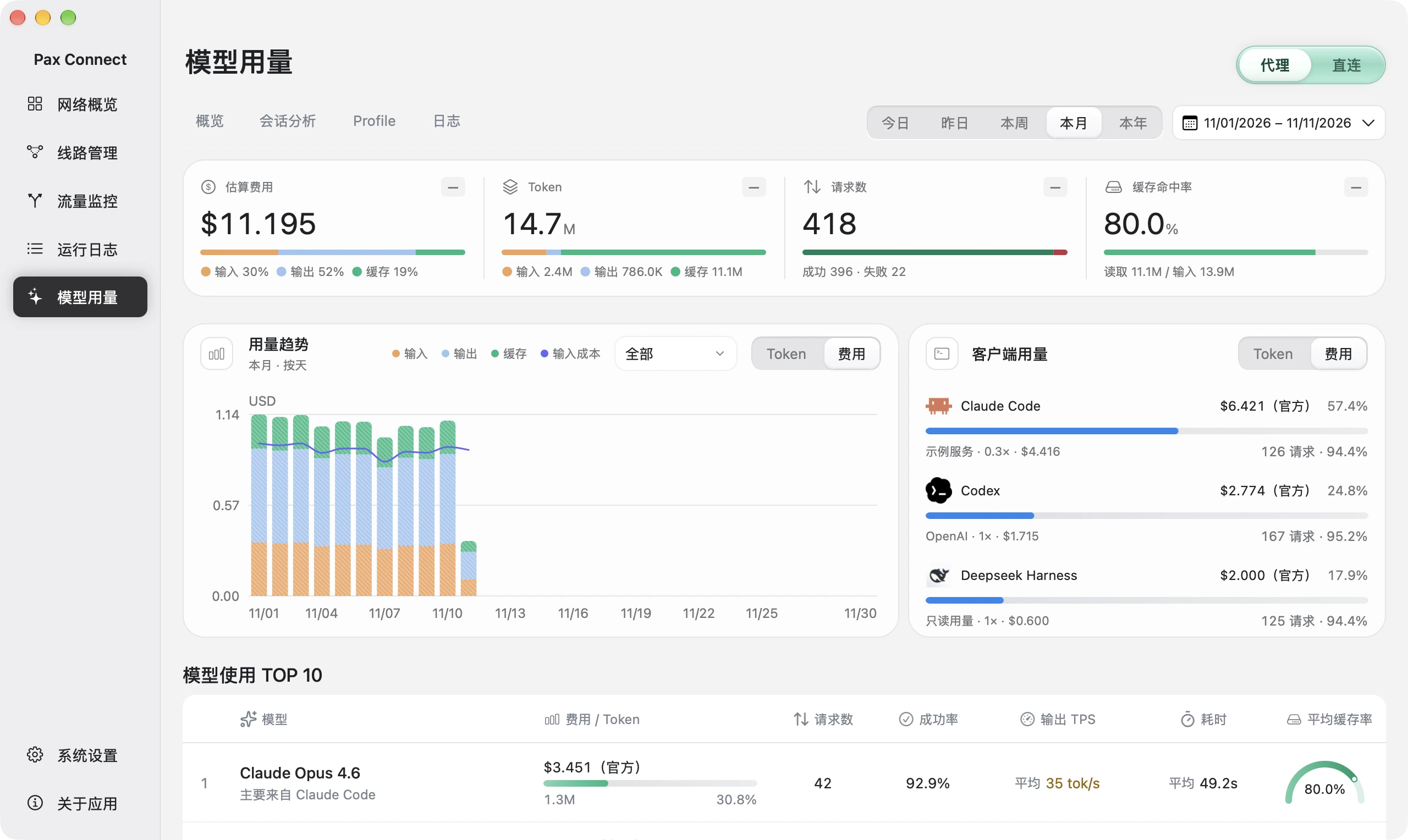
- Choose dates
Use the date controls at the top right. This demo shows simulated monthly records.
- Compare composition
Read totals above, then input, output, cache and the distribution across tools.
- Inspect a session
Use Session analysis to explain a cost change rather than relying on total tokens.
Cache tokens and cost: how to read the numbers
- Cache read and cache write
- Claude Code caches repeated content such as the system prompt and history. Cache reads are priced below normal input; cache writes are priced separately. The cache-read share is by tokens, not by request count.
- Cost is an API-equivalent estimate
- Pax multiplies local token records by a local price table. It is not a bill. Subscription plans, relay multipliers and price changes make real charges differ.
- Pax does not show plan limits
- Session and weekly limits are measured by Anthropic. Check them in /usage or your account settings.
What Pax reads locally
Pax reads Claude Code, Codex and DeepSeek Harness logs on your Mac, stores usage in a local database and adds no forwarding gateway. For unnamed Claude sessions it keeps a preview of the most recent user message, up to 160 characters; it does not store full prompts or replies.
FAQ
How do I check Claude Code usage?
Run /usage in a session (/cost and /stats are aliases) for current-session tokens and an estimated cost. For history, read the logs under ~/.claude/projects/ or use a tool such as Pax Connect.
Where is the Claude Code usage limit shown?
Plan allowance appears in the /usage bars and your claude.ai settings. Pax and local log tools do not show it.
Is the cost Pax shows my bill?
No. It is an API-equivalent estimate from local token records and a local price table.
Does Pax read my conversations?
It reads usage fields from logs. For unnamed Claude sessions it keeps up to 160 characters of the latest user message as a preview, not full prompts or replies.