Pax Connect for Mac · App interface is in Chinese

Codex · Mac

Route Codex through a proxy, use a custom API and track usage on Mac

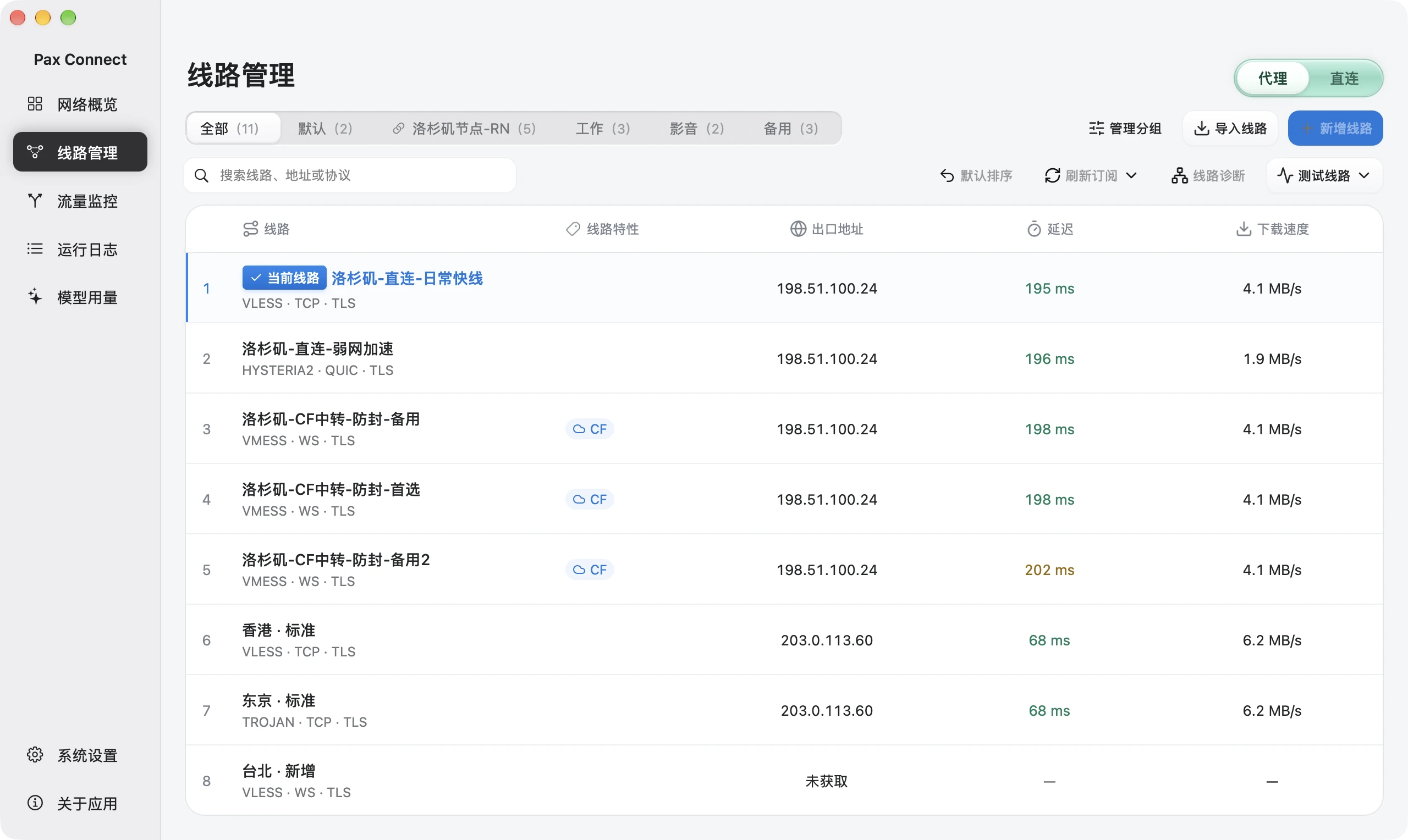
Pax Connect is a sing-box based Mac proxy client: Codex goes through the proxy without environment variables, custom API settings are managed in the app, and token usage and cost are tracked locally. The app interface is in Chinese.

Built on sing-box

TUN takeover, no environment variables

Usage analyzed on your Mac

Where Pax fits

Where Pax sits in the Codex workflow

Pax does not replace Codex. It manages three things around it: how the network is routed, where the API points, and where usage goes.

  1. 01

    Proxy

    Traffic is taken over at the system level, so Codex needs no environment variables.

  2. 02

    Custom API

    An API Profile stores the address and key and applies them to Codex.

  3. 03

    Usage

    Logs are read on your Mac and totaled by date, model and session.

01 · Proxy

Codex through a proxy, no environment variables

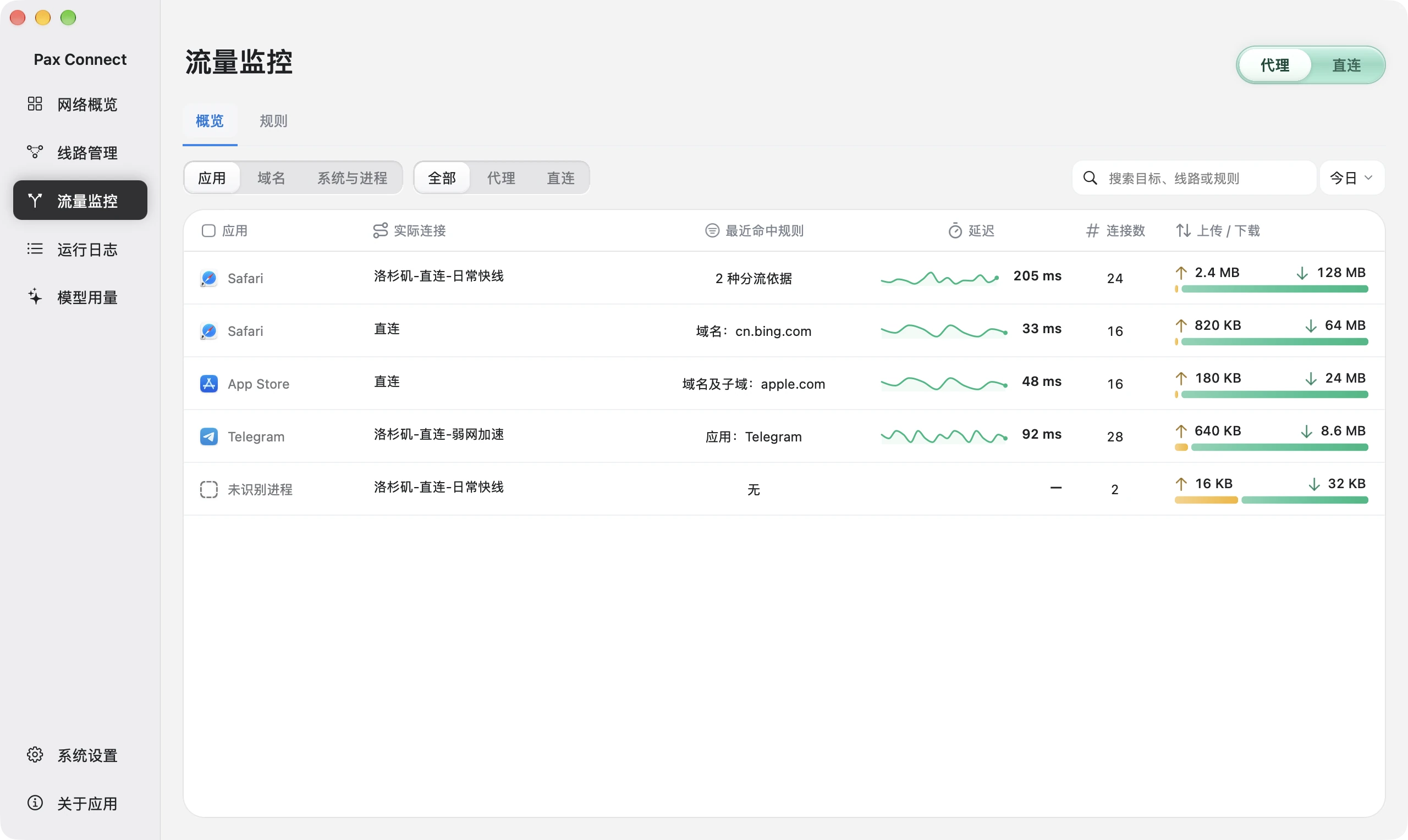
Pax takes over traffic at the system level with TUN, so Codex needs no environment variables. Switch between TUN and the system proxy when needed, and adjust routes and rules in the app.

  • See in traffic monitoring which route the codex process actually used
  • See which rule matched instead of guessing
  • You bring your own route (node or subscription); Pax does not supply one

A working network only shows the network is reachable. Whether Codex can sign in or make calls depends on your account and service.

Traffic overview by application with actual routes, matched rules, latency, connection counts and transfer.
Open Traffic monitoring → Overview to compare source, target and actual route.Actual Pax Demo interface · In-memory simulated data · Chinese UI · Captured November 11, 2026

02 · Custom API

A custom API without hand-editing config.toml

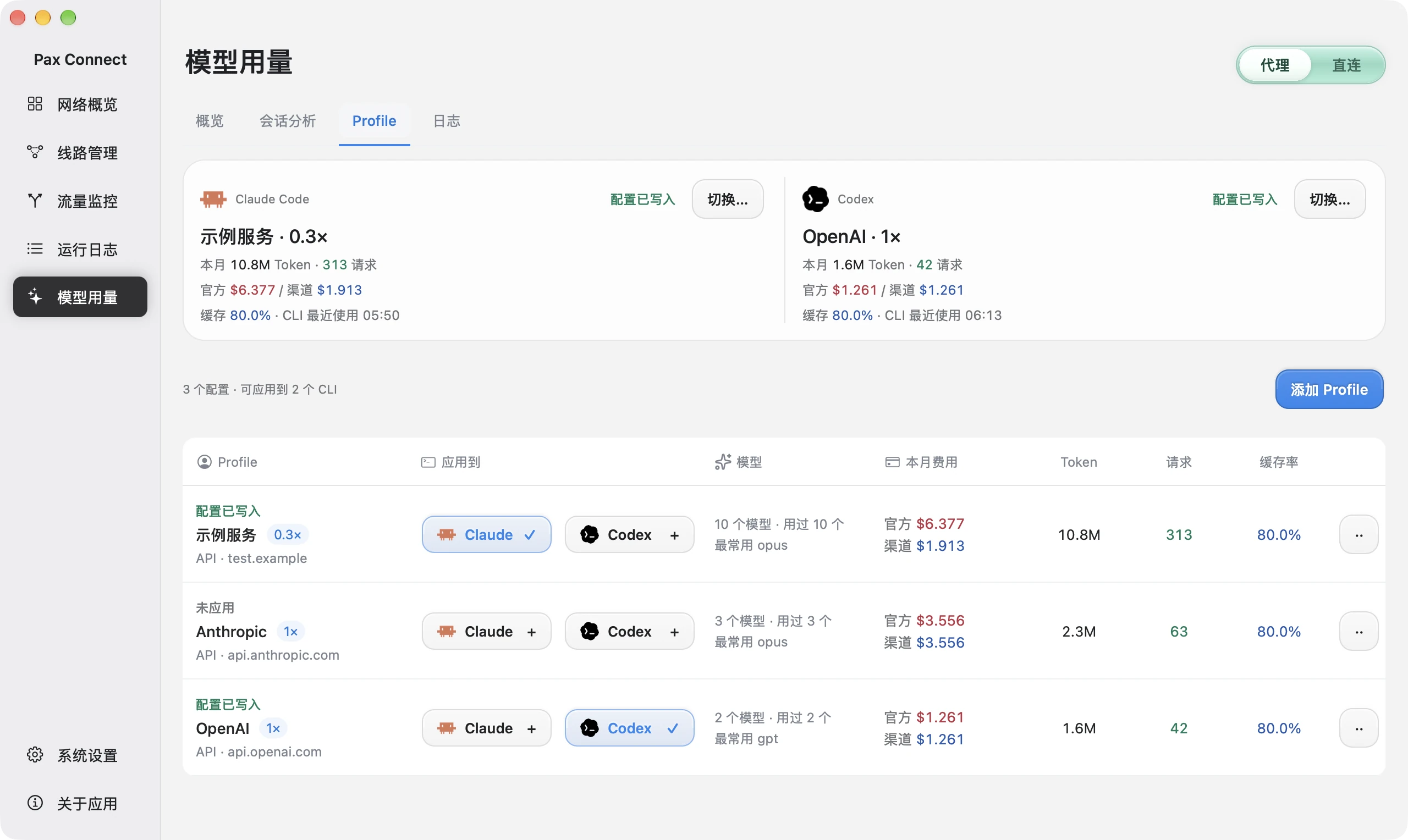
An API Profile stores a service address and key. Applying it to Codex writes base_url into ~/.codex/config.toml and the key into ~/.codex/auth.json. Any address of your own is accepted.

  • Keep several configurations as Profiles and switch without copy-paste
  • Profiles not yet applied are marked, so you can see which one Codex uses
  • Pax neither provides nor recommends any relay service

Saving and applying are separate steps: a profile marked as not applied has not switched Codex yet, and a successful write does not mean a model call will succeed.

Profile page with a test.example sample service, client apply status, and official versus channel costs.
Open Model usage → Profile. Distinguish written configuration from unapplied profiles. test.example is a demonstration address.Actual Pax Demo interface · In-memory simulated data · Chinese UI · Captured November 11, 2026

03 · Usage

See what Codex spends in tokens and cost

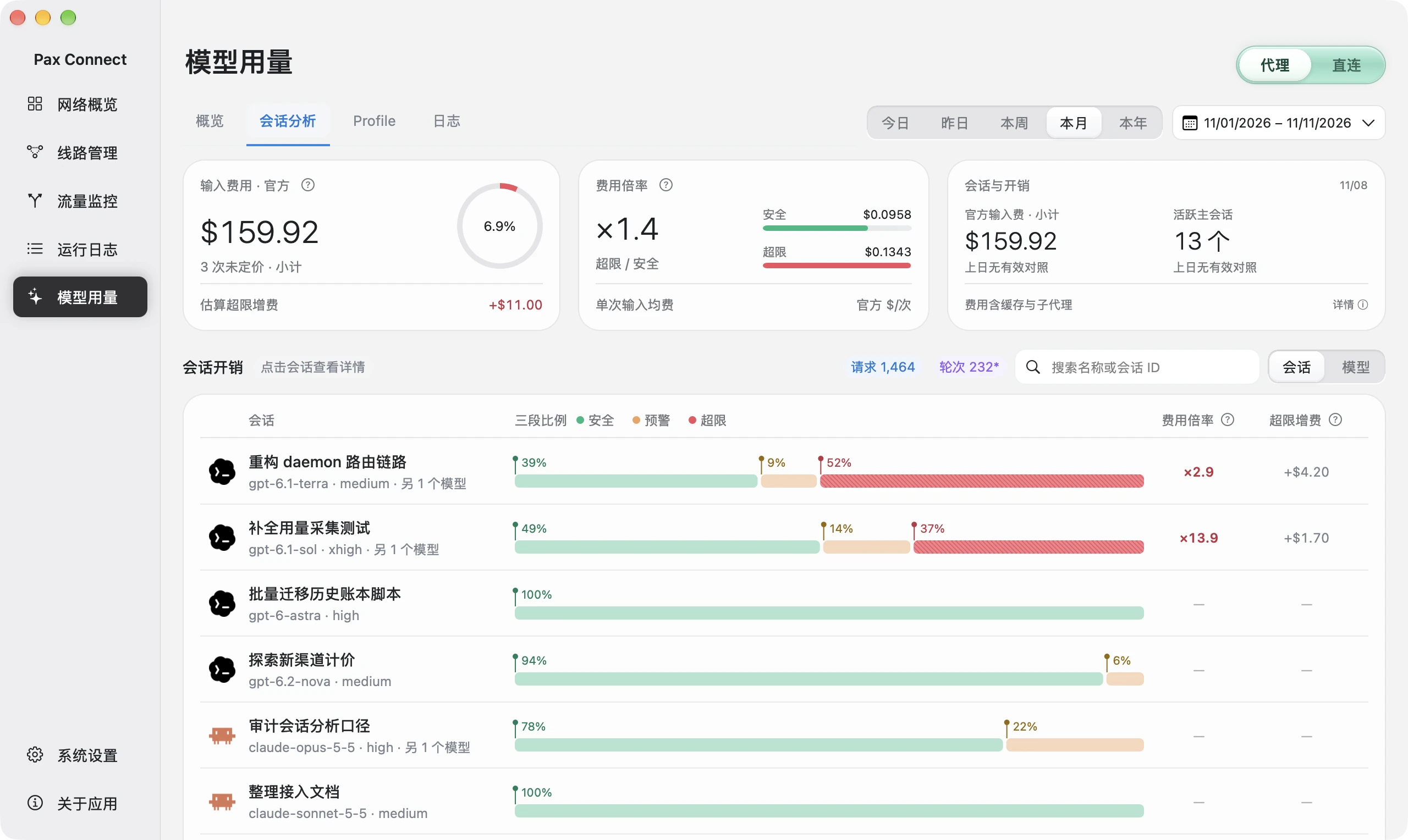
Pax reads Codex logs on your Mac and totals tokens, cache and cost by date, model and session, with the main session and subagents shown separately, so the most expensive session stands out.

  • Tokens, cache and cost by date, model and session
  • Main session and subagents counted separately
  • Viewing usage needs neither the proxy on nor a saved profile

Cost is estimated from a local price table. It is an API-equivalent amount, not a bill, and Pax does not show subscription quotas or limits.

Session analysis summary and session list with input-cost bands, ratios and estimated excess cost.
Open Model usage → Session analysis, then select a task in the session list.Actual Pax Demo interface · In-memory simulated data · Chinese UI · Captured November 11, 2026

Versus manual setup

What you no longer do by hand

Environment variables and config files work. Pax moves the repetitive, error-prone parts into an interface.

TaskManual setupWith Pax Connect
ProxyingSet proxy environment variables in every terminal; edit again when the route changes.TUN takes over at the system level with no variables; routes and rules switch in the app.
Checking the pathTest and guess whether traffic went through the proxy.Traffic monitoring shows the actual route and matched rule per application.
Custom APIEdit base_url in ~/.codex/config.toml and auth.json by hand; keep several setups by copy-paste.Profiles store several setups, write config.toml and auth.json on apply, and mark the unapplied ones.
UsageDig through logs or find a script.Logs read locally and totaled as tokens, cache and estimated cost by date, model and session.

Limits

What Pax does not do

These limits come first, so you do not find them after installing.

Rules cannot select command-line programs

The routing rule interface can only select .app applications, not command-line programs such as codex. To send Codex through a specific route on its own, use a domain rule. With TUN takeover, codex process traffic is still recognized in traffic monitoring.

No routes, no recommended relays

Pax does not supply nodes, subscriptions or relay services, and it does not recommend any relay provider. You bring your own routes and API service.

A working network is not a working account

A successful proxy connection only shows the network is reachable. Whether Codex can sign in or make calls depends on your account and service.

Cost is an estimate, quotas are not shown

Cost is an API-equivalent amount from a local price table, not a bill. Subscription quotas, limits and reset times are not shown.

Limited import formats

Pax imports vless, vmess, trojan, hysteria2, anytls and ss links and Base64 subscriptions. It cannot import Clash YAML or sing-box JSON.

System and language

Requires a Mac with macOS 26 or later on Apple Silicon. The app interface is in Chinese only.

FAQ

FAQ

01

How do I set up a proxy for Codex?

With Pax TUN takeover turned on, Codex goes through the route you selected without any environment variables. For terminal and config-file settings, see the Codex proxy setup guide.

02

Can I route only the codex process through the proxy?

Not directly. Rules can only select .app applications, not command-line programs. A domain rule gives a similar result, and codex process traffic can still be recognized and inspected in traffic monitoring.

03

How do I configure a custom API for Codex?

Enter your own service address and key in a Pax Profile, then apply it to Codex. Pax writes base_url to ~/.codex/config.toml and the key to ~/.codex/auth.json. Saving and applying are separate steps.

04

How do I check Codex usage?

Pax reads Codex logs on your Mac and shows tokens, cache and estimated cost by date, model and session. Cost is an API-equivalent estimate, not a bill, and official quotas and limits are not shown.

05

Do I need the proxy on to see Codex usage?

No. Usage comes from local logs, so it does not depend on the proxy being on or on a saved profile.

Download Pax Connect

This is an unnotarized beta for Macs with macOS 26 or later on Apple Silicon. The button downloads the installer; read the first-launch notes before opening it.

Requirements: macOS 26 or later · Apple Silicon

Pax, on your Mac.

Get the Mac installer. Read the system requirements and installation notes before opening the app.

Download for Mac

macOS 26+ · Apple Silicon

System requirements & installation ↗
Actual Pax Demo interface · In-memory simulated data

Captured November 11, 2026. Chinese app UI; figures are simulated, not measurements or a bill. Click to enlarge.